Accessing the Lancaster Gazette 1801-1894 on-line
Access to the Lancaster Gazette 1801-1894 is provided by the British Library Newspapers online archive.
It is available through Lancashire Libraries and is free if you have a reader’s ticket.
1. Go to Lancashire Digital Library: Newspapers Old and New (opens in new window)
2. Click on British Library Newspapers 1730 - 1950
3. Enter your Library Ticket Number when prompted.
YOU SHOULD THEN BE IN THE BRITISH LIBRARY NEWSPAPER SITE, at a Basic Search page.

4. Click on Advanced Search just below the search box and you will get to the page below:
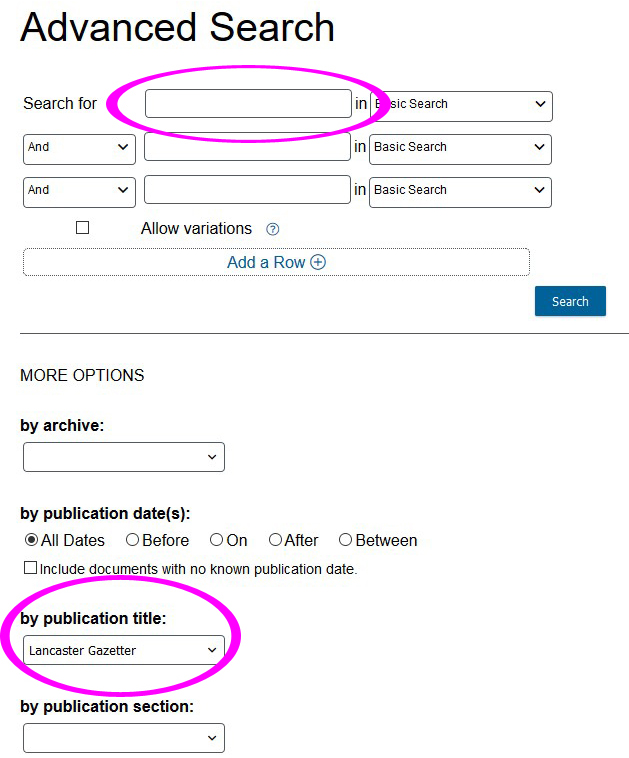
5. Scroll down the page to MORE OPTIONS, click the by publication title drop-down and make your selection(s). You can also narrow the search period using the by publication date(s) options just above.
6. Enter your search terms in the boxes at the top of the page.
7. Click a heading in the results to view an article. The headings given in the search results don't always give you a good idea of what the article is about since they usually refer to the first article or advert on the page, so you need to view each of them in turn. Your search word will be highlighted in the text. Sometimes you need to move between pages in the results to find your search term and you need to use both the scroll bar down the right hand side AND hold down right button on your mouse and pull the article up and down to view the entire page or article.
8. You can save the articles individually as pdf files by clicking on Download button to top right of screen.
9. To return to your search results click the return arrow to the top left of the screen. To start a new search, click Advanced Search again.
10. When you have finished click ‘End Session’ right at the bottom of the screen.